
DNS-Editor
What DNS-Editor is
Section titled “What DNS-Editor is”DNS-Editor manages DNS zones across provider boundaries: one interface for all your domains, whether a zone lives at Hetzner, IONOS, Cloudflare, Route 53, or your own PowerDNS. This documentation covers the Community Edition (CE) — the freely available core for running your own instance.
Example: A team looks after 40 domains, grown historically across four providers. The mail server moves — instead of touching MX records 40 times in four different web consoles, you change one Sync Group and every zone follows. And anyone who edits directly at the provider doesn’t get burned: the deviation shows up as Drift and can be deliberately adopted or overwritten.
The core principle
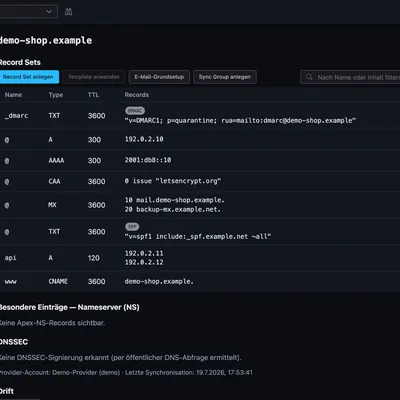
Section titled “The core principle”You always edit a Record Set (RRset): all entries sharing the same name and
type form a single unit that is stored and written to the provider as a whole.
www of type A with three addresses is one record set with three values —
not three rows.
The stored state is the desired state. If the provider deviates from it, the reconciliation reports this as Drift instead of silently overwriting it.
Structure
Section titled “Structure”| Term | Meaning | Example |
|---|---|---|
| Account | Access to a provider (credentials) | “Hetzner Production” |
| Zone | A managed domain; identity = account + zone name | example.com at “Hetzner Production” |
| Project | Container for zones, accounts, and tools; carrier of access grants | ”Customer Meyer GmbH” |
| Record Set | All records of the same name and type as one unit | www A → 203.0.113.10, 203.0.113.11 |
| Sync Group | Living synchronization of shared entries across many zones | ”Mail setup” in 40 zones |
| Template | One-time stamp — applies a set of entries, then independent | Initial setup of new customer domains |
| Source | Named endpoint (IPs); entries bind to it | edge-lb → 203.0.113.10 |
Editions
Section titled “Editions”| Community (CE) | Enterprise (EE) | Cloud | |
|---|---|---|---|
| Zones, Record Sets, Sync Groups, Templates | ✅ | ✅ | ✅ |
| Sources, DynDNS, certificates, Drift | ✅ | ✅ | ✅ |
| Users, teams, projects, roles (incl. per-zone) | ✅ | ✅ | ✅ |
| Inventory & cross-provider search | ✅ | ✅ | ✅ |
| Guided provider migration | ✅ | ✅ | ✅ |
| Audit history, zone restore, security scan | — | ✅ | ✅ |
| Single sign-on (OIDC) | — | ✅ | ✅ |
| Tenants, plans, operator panel | — | — | ✅ |
The Enterprise Edition has its own documentation, as does the Cloud layer for the operator.
Where to start
Section titled “Where to start”- Quick Start — instance up in minutes, including demo mode
- Configuration — all environment variables with examples
- Getting Started — create an account, adopt your first zone
- API and Automation — every feature also via REST, with generated reference