
Operating the admin UI
The admin UI lives at the installation’s base URL (default
http://127.0.0.1:8080) and shares its port with the public API. The
login is the user admin with the password that was printed once to
the console at the first start.
Setup order
Section titled “Setup order”Set up the SMTP route first, then the tenant. A tenant without a
route accepts submissions but cannot deliver them — the admin UI then
shows failed: no smtp route.
SMTP routes
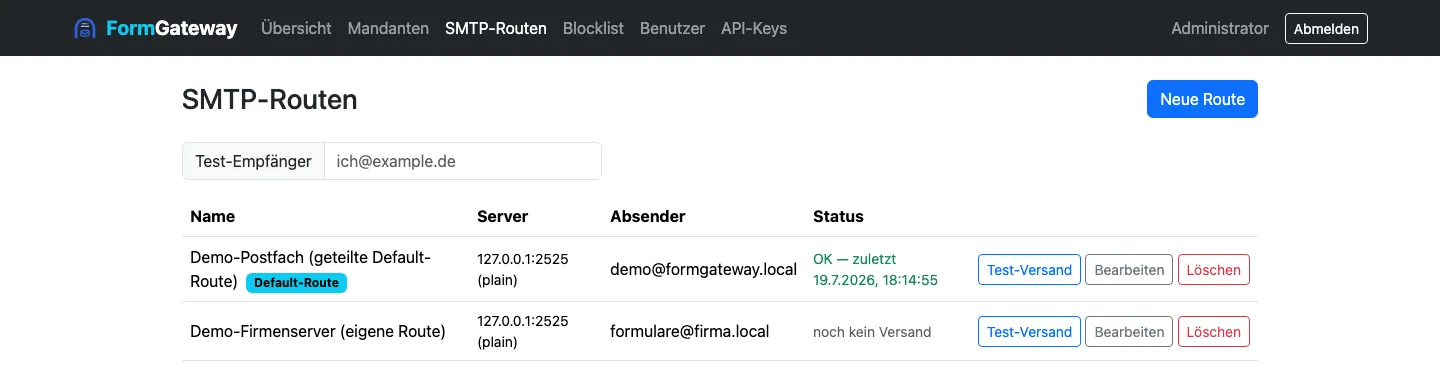
Section titled “SMTP routes”A route is a mail outbox. Exactly one route should be marked as the shared default route; it serves all tenants that have no route of their own configured.
| Field | Note |
|---|---|
| Name | Freely chosen, must be unique. |
| SMTP host / Port | Default 587. |
| TLS | starttls (port 587), implicit (port 465), or plain. |
| Username / Password | Stored encrypted. When editing, an empty password field means “unchanged”. |
| Sender address | Fixed sender for all mail sent through this route. |
| Shared default route | Marks the route as the fallback for all tenants without one of their own. |
The sender address is deliberately fixed and never comes from the
form — it should sit on a domain with properly configured SPF and DKIM
(e.g. forms.example.com). The submitter’s address travels along
instead as Reply-To, so replies still reach the right person.
After creating a route, use test send: enter a destination address and press the button. This checks the connection and login before real forms rely on it. The list shows each route’s last successful send and, if there was one, its last error.
Tenants
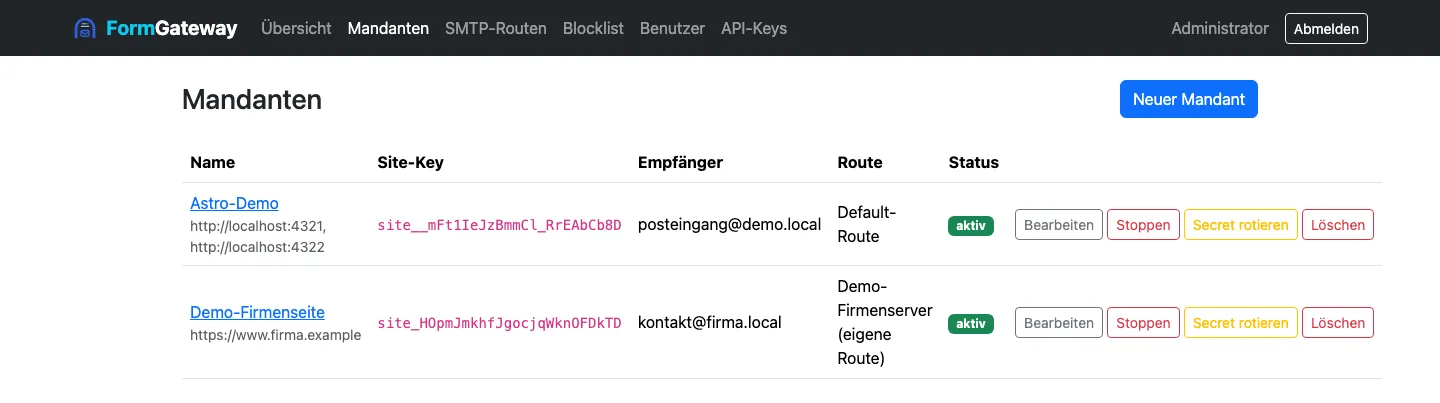
Section titled “Tenants”A tenant is a customer site.
| Field | Meaning |
|---|---|
| Name | For orientation in the admin UI only. |
| Recipient address | Destination for form mail. Never comes from the form. |
| Allowed origins | One per line, with scheme and no path: https://www.example.com. For local testing, also http://127.0.0.1:8099. |
| Daily quota | Mails per day; empty or 0 means the default of 100. Counts both pending and sent. |
| PoW bits | Required leading zero bits in the proof of work. 0 disables it. |
| Spam threshold | Above this score, a submission moves into quarantine. 0 disables scoring. |
| Min. fill time (s) | Faster submissions are treated as bots. 0 disables the check. |
| SMTP route | Its own route, or the shared default route. |
| Active | The kill switch. |
After saving, the list shows the site key (site_…) — it belongs
in the customer site’s form
(Embedding the form).
Choosing the right numbers
Section titled “Choosing the right numbers”PoW bits is the one value where you can noticeably annoy visitors: the browser hashes the solution alone via WebCrypto. Roughly 12 bits correspond to about one second, 18 bits already to about 40 seconds. 8–14 is a sensible range; anyone going higher should test on an old phone first.
Origins are the sharpest and also the most common source of
errors: the entry must exactly match the browser’s Origin header —
with scheme, no path, no trailing slash. www.example.com and
https://www.example.com are two different things, and anyone serving
both variants needs to enter both.
Kill switch
Section titled “Kill switch”The active toggle in the tenant list immediately rejects everything from that site — the right response when a form is under attack. The tenant itself is kept, nothing is deleted; a second click brings it back into service.
Submissions and quarantine
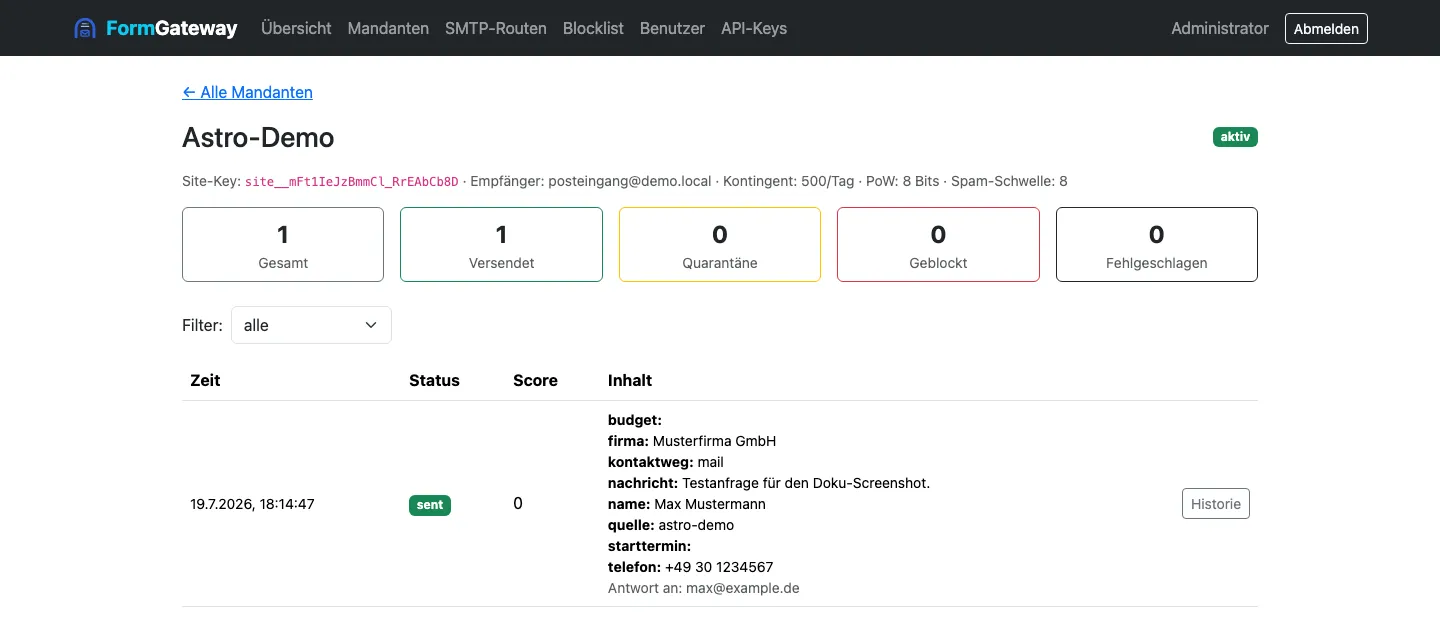
Section titled “Submissions and quarantine”The tenant detail page lists all submissions with their status, filterable via the dropdown:
| Status | Meaning |
|---|---|
received | accepted, not yet finally decided |
sent | delivered |
quarantined | above the spam threshold, awaiting a decision |
released | released from quarantine and sent |
discarded | discarded from quarantine |
blocked | rejected by the checking pipeline (e.g. honeypot) |
failed | delivery ultimately failed |
The score itself (spam score) is not a separate status — it lives in
the Score column next to the status and is already shown at
received once the checking pipeline has run.
For quarantined submissions, Release and Discard appear —
Release sends the mail out after all. Both require the
quarantine:manage permission.
Every submission carries its full status history: the event chain is the audit log, nothing is overwritten. Example history for a regularly delivered mail: received → scored (score 2) → delivered via route “default-smtp”. One that landed in quarantine and was later released additionally shows quarantined (score 9) → released by admin.
Blocklist
Section titled “Blocklist”Blocks senders permanently, independent of tenant. Four kinds:
| Kind | Example |
|---|---|
| IP | a single address |
| CIDR | an entire address range |
| ASN | an entire provider network |
| the submitter’s reply address |
Every entry has a note field — use it. In six months nobody else will know why an entire ASN is blocked. Entries take effect immediately; they are mirrored into the reputation store.
Users and roles
Section titled “Users and roles”Users get roles, roles bundle permissions. The catalog lives in the
code and only changes with a release — the viewer role, for example,
may read but not change anything. Role changes take effect immediately,
because permissions are fetched fresh from the database on every
request rather than stored in the token.
The system user exists for background processes and cannot log in.
Details: Security.
API keys
Section titled “API keys”For processes without a browser (monitoring, CI). When created, the
plaintext key (fgw_…) appears exactly once — after that only its
hash lives in the database. Use it as an X-API-Key header.
Each key inherits the permissions of the user who created it. The
read scope additionally restricts it to read-only methods; the
server rejects write access with a 403. Keys can be given an expiry
date and revoked at any time.
When something doesn’t arrive
Section titled “When something doesn’t arrive”| Observation | Approach |
|---|---|
| Form immediately reports an error | Origin not on the allowlist — enter it exactly, with scheme and no path. |
| ”Send failed” despite a matching origin | Tenant inactive, daily quota exhausted, or rate limit. The reason is in the log, not in the response. |
| Sending noticeably takes a long time | PoW bits too high, see above. |
Status failed: no smtp route | There is no (default) route. |
| Mail permanently ends up in quarantine | Spam threshold too low for this site’s typical content. |
More detailed troubleshooting on the topic’s own page: Embedding the form.