
Backups
LCM backs up its own state into an encrypted, portable archive. A backup contains everything that makes up an instance - it can be fully restored on a fresh instance.
What’s in the archive
Section titled “What’s in the archive”An .lcmbak is an encrypted ZIP. It bundles:
- the database snapshot (consistent SQLite snapshot),
- the master key (
lcm.key) - without it the at-rest encrypted fields would be unreadable, - the configuration (
config.json), - the TLS certificate.
It is encrypted in one of two ways - the Encryption column of the backup list shows which:
| Mode | How | Needed to restore |
|---|---|---|
| Recipient keys (recommended) | age, X25519: the archive is encrypted to one or more public keys. No secret lives on the server. | the private key of one recipient |
| Passphrase | scrypt derivation + AES-256-GCM. | the passphrase |
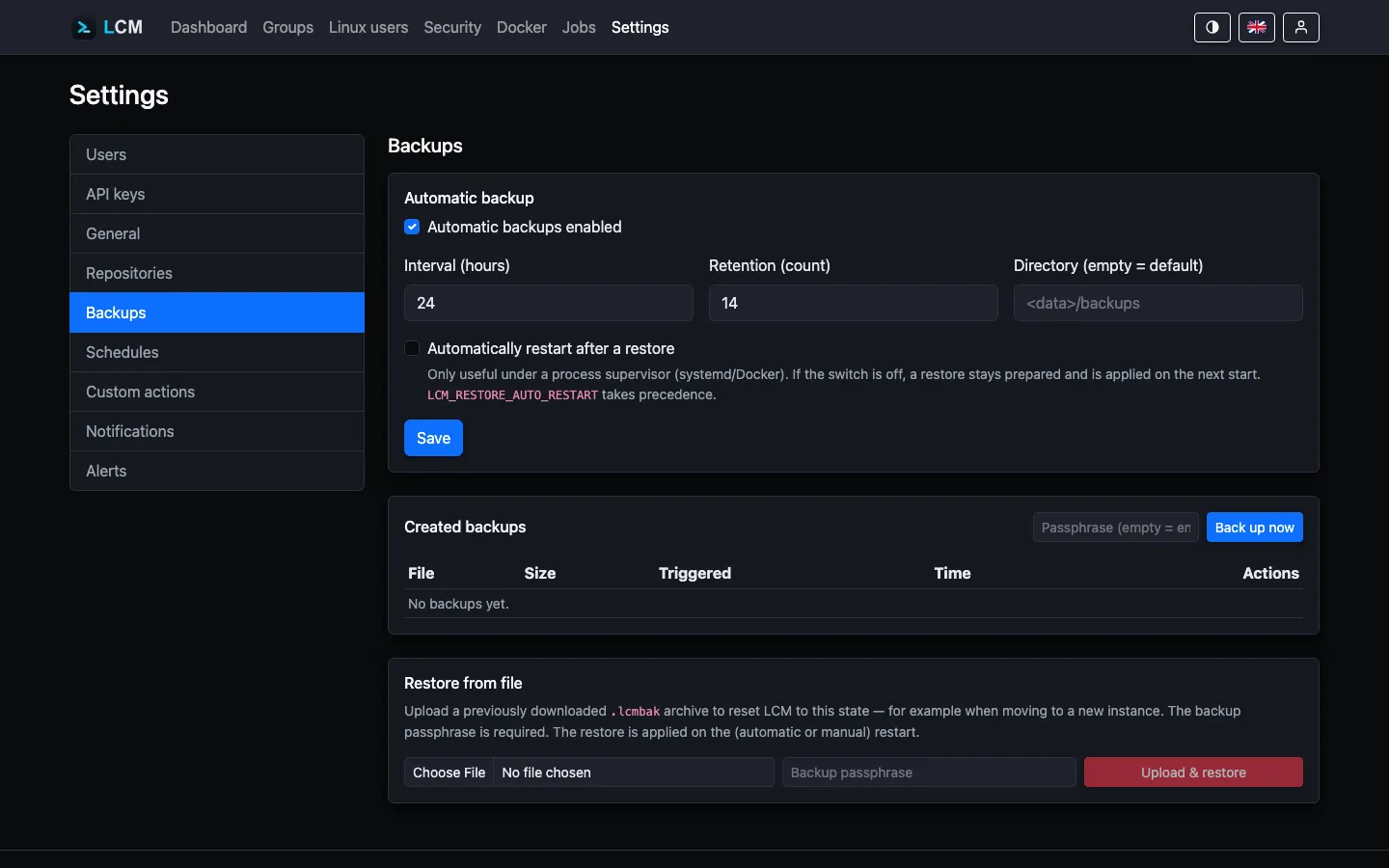
Create a backup now
Section titled “Create a backup now”Under Settings → Backups, “Back up now” immediately produces an archive.
If the passphrase field next to it stays empty, the same order applies as for
scheduled backups (recipient keys, otherwise the stored passphrase); a typed
passphrase wins and encrypts exactly this archive with it. LCM takes a
consistent snapshot of the database (VACUUM INTO) for this - so a backup
can be created while running.
Recipient keys (recommended)
Section titled “Recipient keys (recommended)”With recipient keys the scheduled backup needs no secret on the server: the public key is enough to encrypt, the private key stays with you. Whoever takes over the host gets the archives - but not the key to them.
- Under Settings → Backups click “Generate key pair”. LCM shows the
private key (
AGE-SECRET-KEY-1…) exactly once and stores it nowhere - put it into your password manager now. - The public key (
age1…) is then in the recipient list; Save makes it effective. Several recipients are allowed, one per line - each of them can restore later. - The badge switches to “Recipient keys set”; the passphrase is no longer used from now on (it stays stored and applies again once the list is empty).
A key pair can equally be generated with the age-keygen tool - the format
is the same; then enter only the public part. An archive can also be opened
with the private key without LCM:
age -d -i key.txt lcm-backup-20260910-033000.lcmbak > backup.zipAutomatic backups
Section titled “Automatic backups”For automatic backups to run, exactly two things are required - both are shown directly on the Settings → Backups page:
- “Automatic backups enabled” is switched on (default: on, every 24 hours).
- A key is configured: recipient keys (see above) or a passphrase - in
the “Passphrase for scheduled backups” field (stored encrypted), as the
systemd credential
backup_passphrase, or as the environment variableLCM_BACKUP_PASSPHRASE. An unattended backup cannot prompt for anything; without a key the schedule cannot be enabled at all, and an enabled schedule found without a key at startup is switched off (warning in the log).
What is configured is shown on the Backups page as a badge (“Recipient keys
set” / “Passphrase set” / “Key missing”); if both are missing while
automatic backups are enabled, a prominent warning with instructions appears
as well. This is how to set the passphrase via the environment - as a systemd
drop-in (/etc/systemd/system/lcm.service.d/backup.conf):
[Service]Environment=LCM_BACKUP_PASSPHRASE=a-long-secretthen:
systemctl daemon-reload && systemctl restart lcmOr in Docker Compose:
services: lcm: environment: LCM_BACKUP_PASSPHRASE: a-long-secretFurther settings:
- Interval (hours) and retention (count) - older backups are cleaned up automatically.
- Time of day - anchors the schedule at a fixed time (server time). If the interval divides the day (1, 2, 3, 4, 6, 8, 12 or 24 hours), backups run at fixed times derived from it - e.g. interval 12 h and time 03:30 → runs at 03:30 and 15:30. Other intervals run relatively; the catch-up watchdog keeps them on track.
- Target directory - always set and pre-filled with the default
(
backup_dirfrom config.json, otherwise<data-dir>/backups). It can be changed freely - handy for a persistent/external volume; clearing the field restores the default on save.
Overdue backups are caught up
Section titled “Overdue backups are caught up”For intervals that cannot be expressed as fixed times of day, the schedule counts from instance start. So that an instance that restarts more often than the interval is long (e.g. due to regular updates) still gets backed up, a watchdog checks every few minutes: if the newest backup is older than the interval (or none exists yet), a backup is caught up immediately - shortly after startup, with no action required. A fresh manual backup also counts as covering the interval.
Leftovers of an interrupted run
Section titled “Leftovers of an interrupted run”A backup run creates two intermediate files: a snapshot of the database
(.snap-….db) and the half-finished archive (….lcmbak.part). Normally it
removes them itself. If the service is killed mid-copy, for instance by a
restart, they stay behind - and unlike the finished archive, the snapshot is
not encrypted.
LCM therefore clears such leftovers on its own: immediately at start, and after every backup, there only those older than six hours (a run in progress must keep its own file). Every removed file is logged with size and date:
journalctl -u lcm | grep 'leftover file of an interrupted backup'Restore
Section titled “Restore”Two paths:
- From history - select an earlier backup directly for restoration.
- From an uploaded archive - upload an
.lcmbak, even on a fresh instance (fresh-instance restore).
The field “Passphrase or private age key” takes whatever the archive was
encrypted with - LCM recognises a key by its AGE-SECRET-KEY-1 prefix. A
passphrase given for a recipient-encrypted archive is rejected with a clear
message.
The restore runs via staging + apply-on-startup: LCM stages the
files to be restored and applies them on the next start.
Whether LCM restarts itself for this is controlled by RestoreAutoRestart or the
environment variable LCM_RESTORE_AUTO_RESTART - sensible only under a
process supervisor (systemd/Docker with a restart policy). If auto-restart is off,
the restore stays prepared and the operator starts manually.
The environment variable takes precedence over the UI setting (truthy
values are 1, true, yes, on). On the orderly restart LCM exits with a
non-zero exit code so that Restart=on-failure (systemd) or a Docker restart
policy kicks in:
[Service]Environment=LCM_RESTORE_AUTO_RESTART=1Restart=on-failure