
Security & CVE Scans
LCM bundles several security features - for the managed servers and for the LCM instance itself. The deeper fundamentals (argon2id, JWT, RBAC, encryption) are covered in the Security Model.
CVE scan of the package inventory (Trivy)
Section titled “CVE scan of the package inventory (Trivy)”The package inventory of all servers, centrally recorded in the database, is
regularly checked against the Trivy vulnerability database - agentless:
per server, a CycloneDX SBOM is generated from the package records and scanned
locally on the LCM host with trivy sbom. The managed servers are
not contacted again for this.
- Schedule: cron configurable (Settings → General), default daily 04:00.
- After package updates: whenever LCM updates packages (all/security/targeted updates, manually or via a rule), the package inventory is re-read and the server’s CVE assessment is re-run immediately and automatically - so no stale security labels linger on packages that have already been fixed. (Only when the CVE scan is enabled and Trivy is available.)
- Status effect: critical CVE → status 🔴, high CVE → 🟡, each with an insight explanation. Badges sit right on the affected package row.
- Views: per server in the Security tab, globally on the Security page (most critical first).
- Graceful degrade: if Trivy is missing on the LCM host, the feature
disables itself cleanly (notice in the UI and job log). Trivy is in no
standard package source of Debian/Ubuntu and is therefore set up separately
- see Installation.
- Alerts: the “Security/CVE” alert rule notifies from a configurable minimum severity - see Alerts.
Docker images are scanned by the same procedure, see Docker Monitoring.
The scanner runs sandboxed
Section titled “The scanner runs sandboxed”Trivy is a child process of LCM and would therefore run with the same rights -
reaching /var/lib/lcm, where the database and the master key sit next to each
other. From those, the SSH keys and passwords of all managed servers could
be decrypted. This is not theory: in the Trivy supply chain compromise of March
2026, the injected binaries searched more than 50 paths for exactly this kind
of data.
LCM therefore starts the scanner in a sandbox. Of LCM’s files, only what the scan genuinely needs is visible:
| Visible to Trivy | Access |
|---|---|
| Trivy binary, system libraries, CA certificates | read |
| the generated SBOM (a single file) | read |
| the vulnerability database cache directory | read + write |
its own, empty /tmp | read + write |
Everything else - app.db, lcm.key, /etc/lcm, the home directories - simply
does not exist for that process: a read attempt ends with “no such file”,
not with “permission denied”.
On top of that comes network separation: the SBOM scan only evaluates the local database and runs without any network at all. Even a tampered scanner would have no way out. Only the database download and the image scan get a connection, because they cannot work without one.
This is implemented with bubblewrap (its own mount and network namespace,
installed together with Trivy). If it is missing, Landlock takes over,
provided the kernel has it enabled - careful: many kernels ship Landlock but do
not list it among the active LSMs (/sys/kernel/security/lsm); the Proxmox
kernel, for instance, does not without an lsm= boot parameter.
If neither is available, the scan runs unsandboxed as before - but with a visible notice on the scanner display. A silent fallback would be the worst option: you would believe yourself protected without being so.
Status weighting
Section titled “Status weighting”For status and alerts, the raw Trivy severity is weighted by context (the Security page still shows the raw rating):
- Docker CVEs do not count by default - container isolation limits the blast radius, and the image vendor is responsible for image contents. Only containers marked as CVE-relevant in the Docker tab count, at full severity (see Status calculation).
- CVEs of exposed packages one level higher - web servers, reverse proxies,
mail/DNS/file servers, databases, etc. The list is maintained under Settings →
General (
CVE high-weight packages); LCM additionally detects packages listening on externally reachable ports and weights them up automatically.
Security page: bulk update & Docker filter
Section titled “Security page: bulk update & Docker filter”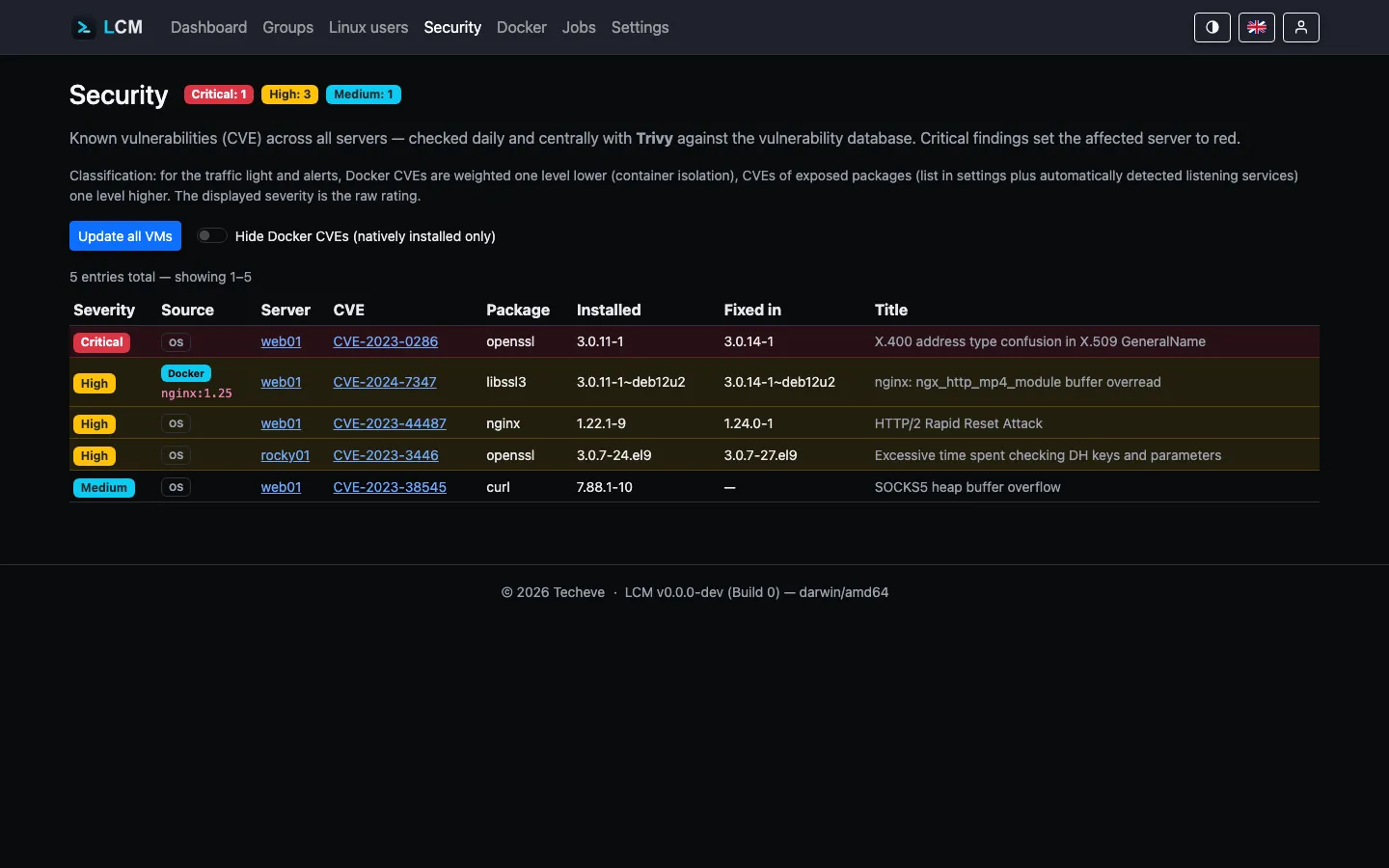
The Security page (global CVE overview) offers two tools:
- Update all VMs - applies security updates on all reachable servers, one
after another. While running, the button is disabled and shows progress
(
x/Nservers done); afterwards it reports how many were updated or failed. At most one bulk run happens at a time. - Hide Docker CVEs - a filter that shows only natively installed package findings (container findings are hidden). Each row’s origin is marked as an OS or Docker badge (with image reference).
Operating system out of support (EOL)
Section titled “Operating system out of support (EOL)”If a server runs a distribution that is no longer receiving security updates (end-of-life) or reaches end of support in less than a month, the server is classified as red/critical - regardless of individual CVEs. Support timelines (Ubuntu/Debian release cycles) are built into LCM; the server detail shows a “supported until …” or “support ends soon” badge.
Status tier “Excellent”
Section titled “Status tier “Excellent””Above 🟢 OK there is the “Excellent” tier (rich green): spotless - not a single known CVE, SSH hardened and firewall active (Proxmox brings its own firewall and counts as covered).
How current is the vulnerability database?
Section titled “How current is the vulnerability database?”Trivy downloads its database itself when scanning - but only with network access to the registry. If the LCM host is isolated, sits behind a proxy or hits a rate limit, Trivy warns and keeps scanning with the old database. The result is then not an error but “no vulnerabilities found”.
That is the dangerous variant: a three-week-old database looks exactly like a genuinely clean server. LCM therefore states the database state explicitly:
- The Security page shows above the findings list when the database is from
- with a warning if it is outdated. How much the list below is worth depends on exactly that.
- The server detail of the LCM host shows Trivy version and database state right on the Trivy card.
- If the database is outdated, every server gets a note in its status popover. Deliberately only a note: the traffic light stays unchanged, because this is a problem of the LCM host - colouring all servers for it would report one single cause as many server problems.
What counts is when the vendor built the database, not when this host fetched it: re-downloading the same old database daily still leaves you with old data.
| Age | Tier | Effect |
|---|---|---|
| < 48 h | current | nothing shown (Trivy refreshes on a 24-hour rhythm) |
| from 48 h | outdated | warning on the security page, note per server, alert |
| from 7 days | critical | as above, more prominently marked |
The 48 hours deliberately survive one failed nightly run without letting real rot slip through.
Updating the database: the button on the security page downloads it right
away (trivy --download-db-only). It runs as a job - a failure lands in the log
together with Trivy’s output, and that is exactly where the cause shows up (no
network, proxy, rate limit).
Alert: the rule “CVE database outdated” (Settings → Alerts) reports the state actively. Without it the state would only surface if someone looked - for a fault that looks like “no vulnerabilities” from the outside, that is the wrong expectation. Only the LCM host is checked, since that is where the scanner is.
Which kernel is actually running?
Section titled “Which kernel is actually running?”The question sounds trivial and isn’t: after a kernel update the new kernel is installed but only runs after a reboot. The package list then claims “everything up to date” while the machine keeps working with the old kernel - including the holes the new one closes.
LCM separates the two cleanly:
- Running kernel - from
uname -r. That is the only source that cannot lie: it reports the actually booted kernel, not what the package manager holds. Shown in the overview of the server detail page. - Installed kernels - as a separate card, newest release first, each entry marked: running, awaiting reboot (newer than the running one) or fallback (older). The latter are what saves you when a new kernel does not boot - which is why they should be visible.
The list is collected per package manager with its own mechanism:
| System | Kernel packages |
|---|---|
| Proxmox (PVE/PBS/PMG) | proxmox-kernel-* and pve-kernel-* (older naming) |
| Debian / Ubuntu | linux-image-* |
| RHEL family (dnf/yum) | kernel, kernel-core |
| openSUSE / SLES | kernel-default* |
| Arch | linux, linux-lts, linux-hardened, linux-zen |
| Alpine | linux-lts, linux-virt, linux-edge |
Proxmox deliberately gets its own branch: there the kernels are not
provided by linux-image packages. A plain linux-image filter would simply
find nothing on a PVE host.
Meta packages are skipped. linux-image-amd64 or proxmox-kernel-6.8
install no concrete kernel, they merely point at the newest one. Counting them
would distort the number of fallback kernels actually present.
SSH hardening
Section titled “SSH hardening”On the server detail page a server can be hardened: LCM writes an
sshd_config drop-in that restricts login to certificates
(password login off). The hardening can be reversed again via toggle. A
hardened server is reconnected via the system SSH key.
Firewall (ufw)
Section titled “Firewall (ufw)”Per server or as a group rule, ufw can be enabled and a list of TCP ports to open can be set (SSH always stays open). As a baseline rule the desired port configuration is checked on every connection and restored on deviation.
Two-factor authentication (2FA)
Section titled “Two-factor authentication (2FA)”Any user can set up a TOTP method under My Account → Two-Factor
(QR code for authenticator apps). Optionally, 2FA can be enforced for
certain roles (Settings → General,
Enforce 2FA for roles).
Restricting network access to LCM (IP allowlist)
Section titled “Restricting network access to LCM (IP allowlist)”By default, any IP that can reach the LCM port may call the web UI and API
(access control then happens via login/RBAC). In addition, you can restrict
network access to specific client addresses - configured in config.json
(restart the service after changes). Clients that are not allowed receive a
403 before login, logging or any controller runs.
{ "allowed_ips": ["private"], "trust_proxy_header": false, "trusted_proxies": []}Each entry in allowed_ips is either a keyword or an IP/CIDR:
| Entry | Effect |
|---|---|
[] (default) | no restriction - any IP may connect |
["localhost"] | only the local machine (127.0.0.0/8, ::1) |
["private"] | private networks (RFC1918, IPv6 ULA, link-local) + localhost |
["203.0.113.5", "10.0.0.0/8"] | exactly these addresses/ranges |
Entries can be mixed, e.g. ["localhost", "192.168.10.0/24"].
As an even stricter alternative, "host": "127.0.0.1" binds the service to the
loopback interface only (making it unreachable from outside entirely). The
allowlist is more flexible when selected remote addresses should be allowed.
Access & roles
Section titled “Access & roles”- Admin - full access.
- Manager - only assigned server groups (tenant separation at the query level).
- Service accounts - API keys with lifetime and scope (
read/readwrite).
Details on permissions, tokens, and encryption: Security Model.