
Docker Monitoring
LCM captures the Docker inventory of every server and checks centrally whether images are outdated or vulnerable. The update check runs entirely on the LCM host - the servers are not contacted for it.
Inventory (agentless)
Section titled “Inventory (agentless)”The system sync captures per server:
- Containers (
docker ps -a) including their assignment to the Compose project via thecom.docker.compose.*labels, - Images (
docker images --digests).
The server flags has_docker / has_compose indicate whether Docker or Compose
is present. Podman and Compose v1 are out of scope.
Central update check
Section titled “Central update check”The Docker check is part of the daily system sync (see
Monitoring). It queries the registry HTTP API for the
current digest behind each tag and compares it with the locally recorded
digest - deduplicated per reference (nginx:1.25 on 12 servers = 1
registry call). Result per image:
- Update available - the registry carries a newer digest.
- not checkable (private) - private registry, not queryable anonymously.
- built locally - no registry digest, not checkable.
The global Docker page lists every unique image across all visible
servers, with a usage count and CVE badges - handy for spotting at a glance
how many servers still run an outdated nginx:1.25:
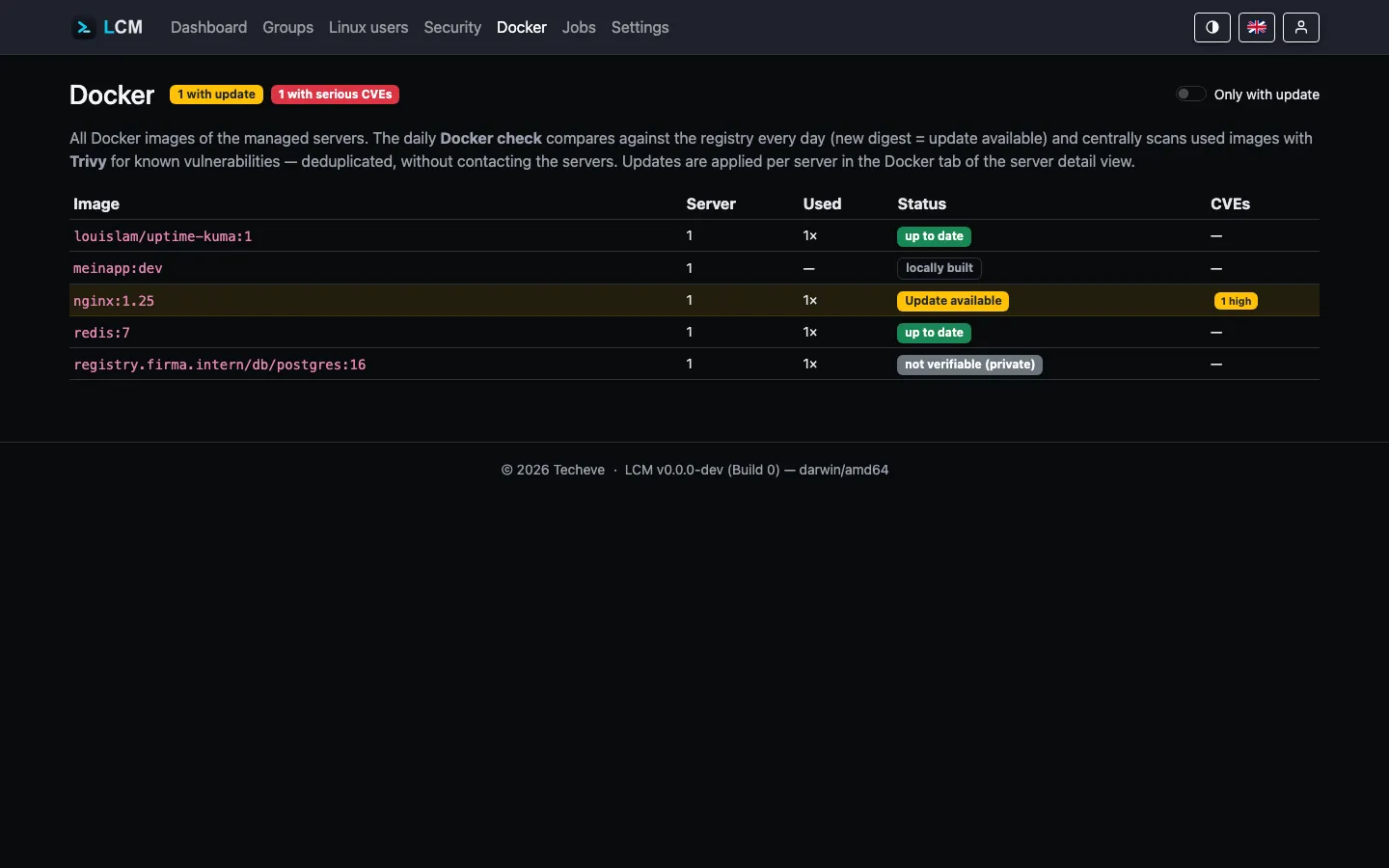
Image CVE scan
Section titled “Image CVE scan”In the same run LCM scans the used images with Trivy - addressed by
repo@digest (exactly the running state) and deduplicated per (repository,
digest). The findings land in the same vulnerability table as the package
scan. By default they do not feed status/alerts - image CVEs only count,
at full severity, for containers marked as CVE-relevant in the container
table (critical → 🔴, high → 🟡; see
Status calculation). Outdated used images → 🟡.
Actions
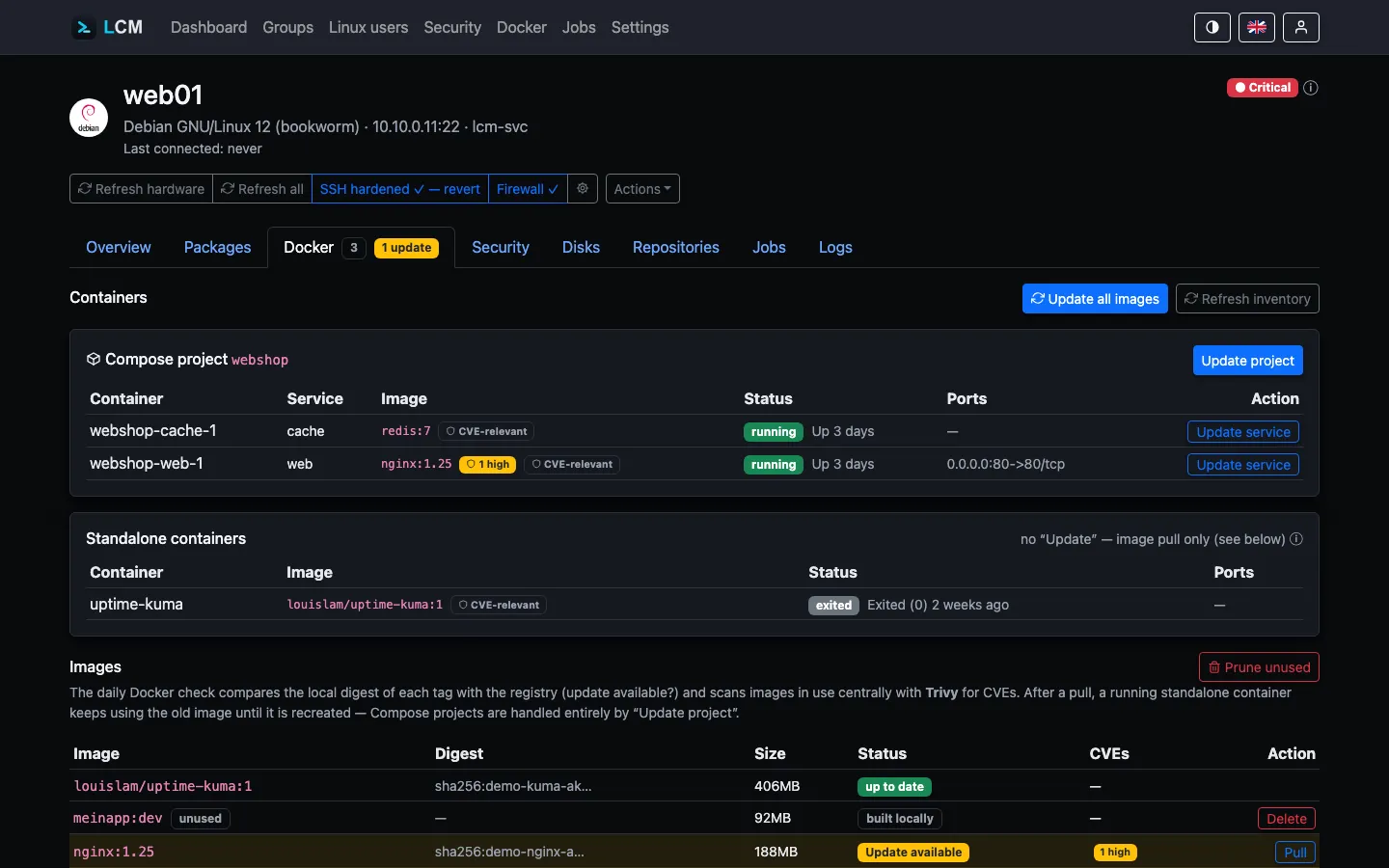
Section titled “Actions”The Docker tab of a server (screenshot below, server web01) shows a
Compose project with two services (webshop) and a standalone container
(uptime-kuma), followed by the image inventory with the CVE-relevant
toggle per container.
- Update Compose project -
docker compose pull && up -din the project’sworking_dir. A single service within the project can be targeted individually via “Update service”. - Update standalone image -
docker pull(recreating the container is deliberately left to the operator, see the hint in the UI). - Update all images - pulls all in-use, tagged registry images of the
server in one job (
docker pullper image); locally built images are left untouched. - Mark as CVE-relevant - a toggle per container: by default, Docker CVEs do not feed the traffic light/alerts (see Status calculation); the toggle explicitly marks a container as relevant, e.g. when its image is directly reachable from outside.
- Delete unused image - individually via button (
docker rmi). - Cleanup rule - the group rule “Docker: clean up unused images”
(
docker-prune) cleans up on a schedule viadocker image prune -af.
All actions run as a logged SSH job with a subsequent inventory rescan.
Example: a server runs ten containers from five different images, and
only nginx:1.25 is exposed externally (port 80/443). Instead of treating
all five images as CVE-relevant, it’s enough to mark just the nginx
container - its CVEs then count fully toward the traffic light, while the
other four images stay excluded unless someone marks them too.
Server switches: watch instead of intervene
Section titled “Server switches: watch instead of intervene”Under Server → Settings → Docker there are two switches that take a server out of LCM’s Docker operations. Both are off by default; nothing changes until someone turns them on.
Do not apply Docker updates
Section titled “Do not apply Docker updates”LCM no longer pulls new image versions on this server - neither manually
(compose update, image pull, “update all images”) nor through a rule
(docker-update-unused). The actions are rejected, and a rule running across
a group skips the server with a note in the log instead of failing.
Monitoring stays complete: inventory, available updates and the image CVE scan keep running. What is switched off is the applying, not the looking - you still see what would be pending.
Intended for servers whose containers are maintained elsewhere: a separate CI/CD pipeline, a vendor handling maintenance, or an environment with fixed maintenance windows. An update from LCM is not misconfigured there - it is simply not wanted.
Ignore CVEs from container images
Section titled “Ignore CVEs from container images”Findings from this server’s container images stay out entirely: they do not count towards status or alerts, and they do not appear in the security overview - not even through its “Docker” source filter.
The findings remain in the server’s own CVE report. That is deliberate: the context is unambiguous there, the switch sits right next to it, and you should be able to see what you are hiding. The overview across all servers goes quiet; the truth about the individual one stays within reach.
Useful when the images come from a vendor whose contents you are not responsible for - and when the alternative would be ignoring a permanently red list. An inventory nobody looks at any more is worse than one that honestly states it is not being examined.
Docker and the host firewall (ufw)
Section titled “Docker and the host firewall (ufw)”Docker puts its forwarding rules in the nat/PREROUTING chain - before the
INPUT chain where ufw filters. A container port published with -p 3001:3001
is therefore reachable from outside even when ufw is active and does not
allow it. This is not a bug but intentional: Docker wants published ports to
work.
LCM detects this and qualifies the firewall display accordingly: next to “Firewall: Active” the server overview then shows a notice listing the affected ports and their containers. LCM does not intervene - whether a port should be public is an operational decision and differs per container.
In addition, externally reachable containers automatically count towards the CVE assessment. Docker findings otherwise only count when a container is explicitly marked as CVE-relevant (see status calculation) - a container reachable from the network is the strongest candidate for that.
Actually closing a port
Section titled “Actually closing a port”Three ways, with different costs:
1. Bind to loopback (recommended for internal services). The cleanest per-case fix: the port is only reachable locally, with a reverse proxy in front.
ports: - "127.0.0.1:3001:3001" # instead of "3001:3001"2. The DOCKER-USER chain (for differentiated rules). Docker traverses this
chain before its own rules and never touches it. A common rule set is
ufw-docker. Note: the rules
reference container IPs, not host ports - they must be maintained as the
stack changes.
iptables -I DOCKER-USER -i <external> -p tcp --dport 3001 -j DROP3. iptables: false in /etc/docker/daemon.json - not recommended. Docker
then manages no iptables rules at all. This breaks container egress NAT and
inter-container communication unless you rebuild the entire rule set yourself.
Docker explicitly advises against it.
Running LCM itself with Docker
Section titled “Running LCM itself with Docker”LCM can also run as a container (not to be confused with the Docker monitoring of the managed servers). See Installation and Packaging for Dockerfiles, a Compose example, and all hardening flags.